
Pip-Boy: How I Control My AI Agents From Discord
I spend a lot of my free time exploring what's possible with the latest AI coding tools. I like to stay hands-on. Approving permissions, answering questions, steering the implementation. When I'm running two or three sessions at once, that's a steady stream of back and forth. And life doesn't wait. I make dinner, run errands, step away from the desk. The sessions keep going whether I'm there or not.
What wasn't working
I started with Termius for mobile SSH. Claude Code's TUI doesn't play nice with phone screens. Scrolling breaks, the layout never formatted right on my phone, and zooming out to fit it all in made everything unreadable. Worse, Termius doesn't trigger text prediction or voice to text. So I ended up squinting at a mangled terminal, fat-fingering every response, then checking for typos I could barely see.
I moved to ntfy for push notifications. At least now I'd know when something needed me. But the notifications were vague. I'd get a ping but not know which of my three tmux windows needed my attention, or what it was asking. I'd still have to open Termius and fight the mobile terminal.
That's when it clicked. The terminal on my phone was never going to work. I needed a better way to stay on top of my agents, without fighting my phone the whole time.
The OpenClaw inspiration
I'd seen OpenClaw and loved the idea: a chat interface instead of a terminal. Anthropic recently shipped something similar with remote control for Claude Code. It's a step in the right direction, but it only handles one session at a time. I'm usually running two or three Claude Code sessions. I didn't need a new platform. I just needed that same idea wired into the tools I was already using.
Keeping things simple
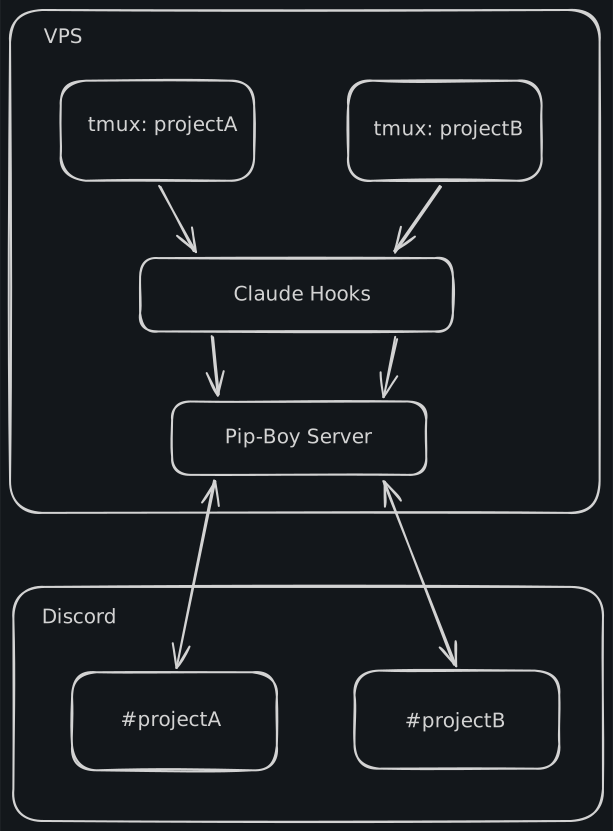
Claude Code has hooks that fire when things happen. A short bash script catches those, tags them with which tmux window they came from, and posts them to a local server. The server formats the message and drops it into the right Discord thread. One thread per project with the same name as the tmux window.
When I reply in Discord, the inverse happens. The bot figures out which thread I'm in, maps it back to the right tmux window, and sends my response through.
It's tempting to throw an LLM at everything, but a deterministic design saves a lot of headache. LLMs make on-the-fly decisions, and on-the-fly decisions mean on-the-fly surprises. They're also really expensive. Why pay for every message when I can build what I need with simple routing and formatting? The code is straightforward and explicit. I don't have to worry about feature drift.
Walking away from the keyboard
The best part is there's no handoff. I'm at my desk working in the terminal, then I walk away and I pick up the same conversation in Discord. Both stay in sync. No mode to switch, nothing to reconnect.
When something does break, it's easy to find. Early on I had code that identified projects by their working directory instead of the tmux window name. Two projects in similar paths were getting routed to the wrong Discord threads. Debugging was straightforward, every message in Discord is tagged with where it came from. I made a small change to always use the window name and I saw the right labels show up.
Building for yourself
A few years ago this would have been a side project that I'd never finish. But with AI coding tools, the gap between "I wish I had this" and "I built it" is getting smaller every day. This whole thing is a few hundred lines of TypeScript and a bash script. It's not a product. It's just mine, built exactly how I want it.
Having Pip-Boy send messages from Claude to Discord was the easy part. Sending back simple text worked fine. But permission prompts, interactive menus, and edge cases? That last 20% was a whole different story.